
Why AI-to-SQL Works in Demos but Fails on Enterprise Databases
Ask an AI tool "What were our top 10 customers by revenue last quarter?" against a sample 8-table database, and it works. Run it on an enterprise ERP with thousands of tables, and it fails. Discover how schema retrieval, semantic layers, and SQL validation solve this.
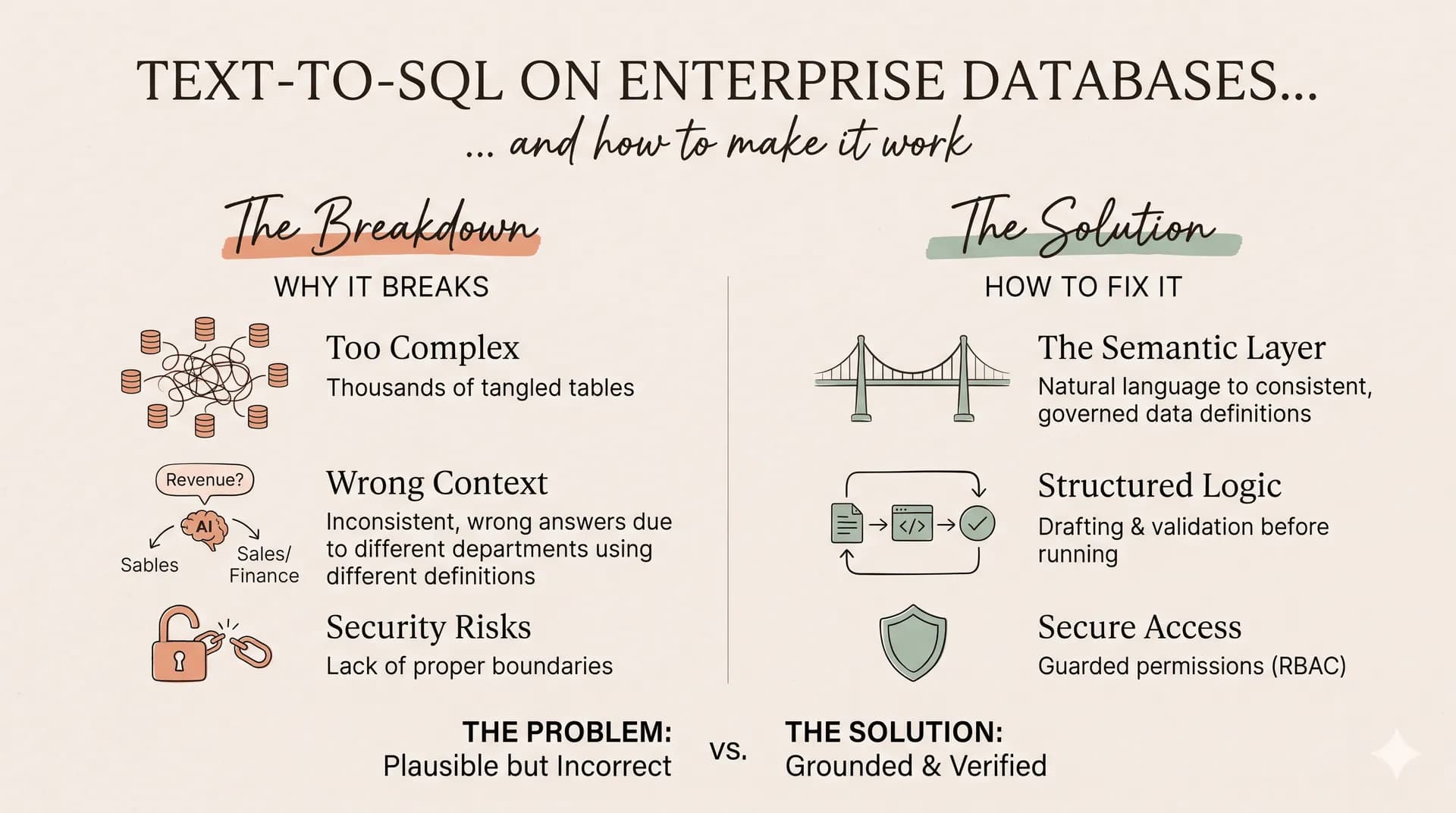
Ask an AI tool, "What were our top 10 customers by revenue last quarter?" against a sample database with eight tables, and it will often generate a reasonable SQL query.
Now ask the same question against a production ERP system containing thousands of tables, hundreds of thousands of columns, and years of accumulated business logic.
The result can be very different.
The model may select the wrong tables, generate incorrect joins, misunderstand revenue, or return results that look accurate but do not reflect the business reality.
This is one of the biggest challenges in building reliable enterprise Text-to-SQL systems.
The problem is not simply that large language models struggle to write SQL. It is that enterprise databases contain far more complexity than a model can reliably understand from a single prompt.
Reliable enterprise Text-to-SQL requires more than SQL generation. It requires the right database context, accurate business definitions, valid relationships, and a way to verify the query before execution.
The Demo Database Trap
Most Text-to-SQL demonstrations use relatively small, clean databases.
A typical example might contain tables such as:
- customers- orders- products- payments
The relationships are easy to understand. Table names are descriptive, columns are familiar, and the business logic is relatively straightforward.
Enterprise databases look very different.
Systems built around Oracle E-Business Suite, SAP, and other large ERP platforms can contain thousands of tables and complex data models.
Consider tables such as:
- MTL_SYSTEM_ITEMS_B
- RA_CUSTOMER_TRX_ALL
- AP_INVOICES_ALL
These names may be familiar to an ERP specialist, but they are not self-explanatory to a general-purpose language model.
Even when the model identifies a relevant table, it still needs to understand:
- Which columns contain the required information.
- How the table relates to other business entities.
- Which relationships are valid for the question.
- Whether the data represents transactions, balances, or summaries.
- Which business rules determine the final result.
In enterprise systems, the correct answer often depends on knowledge that is not directly visible in table or column names.
This is where generic AI-to-SQL approaches begin to break down.
Three Reasons Enterprise Text-to-SQL Fails
1. Schema Context Overload
An LLM can only process a limited amount of context at a time.
Providing the complete schema of a large enterprise database can exceed the model's context window or consume so much of it that important information becomes difficult to use effectively.
Even when the schema technically fits, including thousands of irrelevant tables creates unnecessary noise.
Imagine asking a model to identify customer revenue while providing metadata for inventory, payroll, procurement, manufacturing, shipping, and financial reporting. The relevant tables become difficult to distinguish from everything else.
This can lead to incorrect table selection, missing columns, and SQL queries built on incomplete context.
The solution is not to provide more schema information. It is to identify which information matters before asking the model to generate SQL.
2. Incorrect Joins and Plausible SQL Hallucinations
Enterprise databases often contain multiple tables that appear relevant to the same business question.
A customer may be represented in a master table, an invoice table, a payment table, and a reporting table. The model must identify not only the correct tables but also the correct relationships between them.
Without reliable relationship information, it may generate joins based on similar column names or assumptions learned during training. The SQL can look perfectly valid and execute without errors while producing incorrect results.
For example, joining invoice headers to invoice lines and then joining payments without accounting for their relationships can duplicate transaction amounts. The result may show inflated revenue or incorrect customer rankings.
The most dangerous SQL error is not a query that fails. It is a query that runs successfully and returns the wrong answer.
3. Missing Business Definitions
Database terminology and business terminology are rarely identical.
Consider the question: "What was our revenue last quarter?"
Depending on the organization, revenue could mean:
- Total invoiced amount.
- Revenue after discounts and returns.
- Recognized revenue based on accounting rules.
- Revenue excluding taxes.
- Revenue from completed transactions only.
Similarly, "active customer" might mean a customer who purchased within the last 90 days, a customer with an active contract, or a customer who has not been deactivated.
A model cannot reliably infer these definitions from table names alone. Without access to the organization's business rules, it may generate technically valid SQL that answers a different question.
This is why enterprise Text-to-SQL needs a semantic layer that connects business language to the underlying database.
How to Improve Text-to-SQL Accuracy in Enterprise Databases
A reliable system should not send the entire database schema to the LLM every time a user asks a question.
Instead, it should retrieve the relevant database context, identify valid relationships, apply business definitions, and then generate and verify the SQL.
Step 1: Build a Database Schema Catalog
Start by collecting metadata from the database. The catalog should include:
- Table and view names.
- Column names and data types.
- Primary and foreign keys.
- Constraints and indexes.
- Table and column descriptions.
- Existing views and known relationships.
This metadata becomes the foundation for understanding the database. Rather than repeatedly inspecting the production schema, the system maintains a searchable catalog that can be updated when the database changes.
For enterprise systems, the catalog may also need application-level relationships and documented joins that are not enforced through database constraints.
Step 2: Use Schema Retrieval and Schema Linking
When a user submits a question, the system should identify the tables and columns most relevant to the request. This process is commonly associated with schema retrieval and schema linking.
For example, the question "Who were our top 10 customers by revenue last quarter?" may require information related to:
- Customers
- Invoices
- Invoice line items
- Credit notes or returns
- Revenue definitions
- Transaction dates
Semantic retrieval helps identify relevant tables based on their descriptions, business meaning, and relationship to the question. Schema linking then maps concepts in the user's question to specific database elements.
Instead of exposing thousands of tables to the model, the system provides a smaller, focused set of relevant metadata.
Step 3: Use a Schema Graph to Identify Valid Joins
Finding the right tables is only part of the problem. The system must also understand how those tables connect.
A schema graph represents database tables as nodes and their relationships as edges:
Customers → Invoices → Invoice Lines
The graph helps identify valid paths between the tables required by a question. When a query needs customer information and transaction revenue, the system retrieves the relevant relationships instead of asking the model to guess the joins.
However, foreign-key relationships alone are not always sufficient. Enterprise systems may contain missing constraints, application-defined relationships, multiple valid join paths, or business-specific rules. A reliable schema graph should combine database metadata with documented and verified business relationships.
Step 4: Add a Business Semantic Layer
The semantic layer connects business terminology to database structures and calculation rules. It defines metrics such as:
- Revenue
- Gross margin
- Active customers
- Monthly recurring revenue (MRR)
- Customer lifetime value (LTV)
Each definition should specify how the metric is calculated, which tables and columns are involved, and which filters or exclusions apply.
When the user asks a question, the system retrieves the relevant metric definition and supplies it alongside the database context. This prevents the model from inventing business logic on the fly.
Step 5: Generate and Validate SQL Before Execution
Once the relevant schema, relationships, and business definitions are available, the LLM can generate the SQL query. But generation should not be the final step.
Important checks before execution:
- Do the referenced tables and columns exist?
- Are the joins based on valid relationships?
- Does the query follow the required business definition?
- Is the query read-only and permitted?
- Does it contain appropriate limits and filters?
- Could the joins create duplicate records or inflated aggregations?
Enterprise Text-to-SQL systems should enforce appropriate database permissions, query timeouts, and resource limits to prevent unintended or expensive operations.
A Practical Example: From Natural Language to SQL
Consider the question: "What were our top 10 customers by revenue last quarter?"
A reliable enterprise pipeline executes in six steps:
1. Understand the question: Identify the requested metric, time period, ranking, and business entity.
2. Retrieve relevant metadata: Find the customer, invoice, and transaction tables, along with relevant columns and relationships.
3. Apply business definitions: Retrieve the approved revenue calculation (handling returns, discounts, and taxes).
4. Identify valid join paths: Use the schema graph and verified relationships to connect customer records to revenue transactions.
5. Generate and validate SQL: Generate the query and check its structure, joins, filters, aggregation logic, and execution permissions.
6. Execute and return the answer: Run the query safely and present the results with the metric definition and relevant context.
What This Means for Businesses Using AI Analytics
The technical challenges of enterprise Text-to-SQL have direct business consequences. An incorrect join can inflate revenue reports. An inconsistent metric definition can cause finance and sales teams to report conflicting numbers.
The question is not simply "Can the AI generate SQL?"—it is "Can the system consistently produce correct, business-relevant answers from our actual data?"
How Zero Queries Fits Into Enterprise Text-to-SQL
Zero Queries focuses on making data accessible through natural-language interaction without sacrificing correctness.
Enterprise readiness requires more than a chat UI. The underlying system must account for database structure, business terminology, relationships, and execution safeguards.
For teams evaluating Zero Queries:
- Can it work with your organization's specific database engines?
- How does it understand your enterprise schema?
- How does it handle multi-table questions?
- How are business definitions and query correctness guaranteed?
- Can it integrate directly into your team's existing analytics workflow?
The best way to evaluate an AI analytics solution is to test it against real business questions—not just a clean demo database.
How to Evaluate an Enterprise Text-to-SQL Solution
When evaluating an AI analytics platform, consider these criteria:
- Schema Understanding: Largest schema tested, method for identifying relevant tables, support for SAP/Oracle.
- Relationship Discovery: Reliance on foreign keys vs. application logic joins.
- Business Definitions: Metric governance, repository ownership, conflict resolution.
- SQL Validation & Security: Pre-execution parsing, read-only enforcement, guardrails against fan-out joins.
- Evaluation & Monitoring: Auditability, reasoning traces, benchmark accuracy on ambiguous queries.
Frequently Asked Questions
What is Enterprise Text-to-SQL?
Enterprise Text-to-SQL is a technology that converts natural-language business questions into SQL queries against large organizational databases. It requires database context, business definitions, and validation to handle complex enterprise data reliably.
Why does Text-to-SQL struggle with large databases?
Large databases contain thousands of tables, complex relationships, cryptic naming conventions, and undocumented business rules. Feeding this directly to an LLM overwhelms its context and leads to high error rates.
How can you improve Text-to-SQL accuracy?
Accuracy improves through schema retrieval, schema linking, verified join graphs, business semantic layers, pre-execution SQL validation, and comprehensive evaluation benchmarks.
What is schema linking in Text-to-SQL?
Schema linking maps natural-language concepts in a question to specific database entities (tables, columns, and foreign keys).
Can AI query SAP and Oracle databases using natural language?
Yes, but reliable querying requires understanding the underlying ERP schema, mapping application-level relationships, and applying organizational metric definitions prior to SQL generation.
Conclusion: Enterprise Text-to-SQL Needs More Than a Language Model
The challenge of enterprise Text-to-SQL is understanding complex databases, retrieving the right context, applying business logic, and generating trusted queries.
A production-grade architecture combines schema retrieval, schema graphs, semantic definitions, SQL validation, and safe execution.
The future of enterprise AI analytics is not about generating SQL faster—it is about making the answers accurate, consistent, and trustworthy.